Highly Available DNS at home with UniFi and BGP anycast
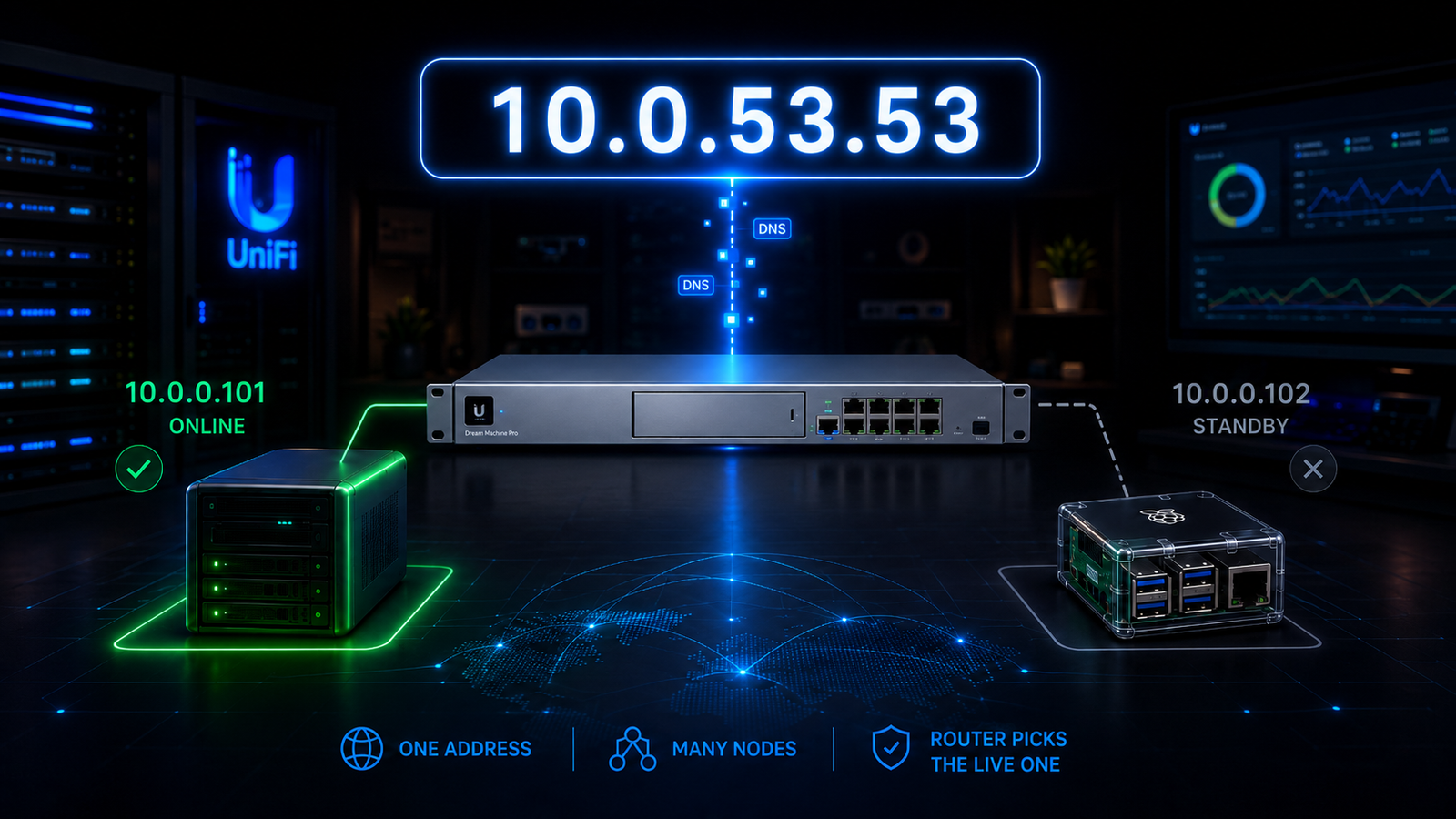
I run ad-blocking DNS for my whole house, and I lean on it hard. Not just for blocking, but as my actual local DNS: a big pile of filtering rules, a few streaming-service whitelists, around 80 local rewrites for internal hostnames, and all outbound flows over TLS to Cloudflare. All public DNS, DoH, and DoT are blocked, to the dismay of all IoT devices that try to bypass. You must go through my Adguard server, or you get no DNS, period. When it works, nobody thinks about it. When it breaks, I hear about it from every room at once.
For a long time, my "highly available" setup was anything but. In this walkthrough, I'll show you how I replaced a fragile keepalived VIP with a routed anycast address that fails over in the gateway's routing table instead of fighting ARP, using a UDM-Pro-SE, two AdGuard Home instances, and about 60 lines of config. When the primary dies now, nobody notices. That's the whole point.
When DNS dies, everyone thinks the internet is down
Here's the thing about DNS: when it fails, it doesn't look like DNS is failing. It looks like the entire internet is down. Every device, every app, every "is the wifi down again?" from down the hall. It's the single worst failure mode in the house, which is exactly why the resolver needs to be the most boring, reliable thing on the network. Even in the corporate world in my day job, "it's always DNS".
The classic way to make DNS highly available is a floating VIP: a virtual IP that lives on the primary and jumps to the backup if the primary dies, usually via keepalived (VRRP) with something like dnsdist in front. I ran exactly that on a Raspberry Pi for a good while.
Why my floating VIP kept flopping
It failed in the most maddening way possible. When I took the primary down, the VIP was supposed to move to the backup...and on my UniFi network, it rarely did, at least not promptly. Clients kept hammering the VIP only to arrive at the dead box, and to every device on the network, it looked like the internet had simply vanished.
The root cause is baked into how VRRP works. When the VIP moves, the new owner blasts out a gratuitous ARP to announce "this IP is at my MAC now." If the switch and gateway don't honor that ARP quickly, traffic keeps flowing to the old, dead MAC until the ARP cache ages out. And UniFi gear is notoriously slow to update its ARP and MAC tables. You can tune GARP timers all day. You're still betting your DNS uptime on the network, believing an unsolicited broadcast at exactly the worst moment. Maybe you've had more luck than I have with this, but after endless config and network tuning, HA still eluded me.
So I stopped trying to make ARP reliable and moved the failover decision to where it's genuinely good: the router's routing table.
The fix: anycast the DNS IP and let BGP make the call
Instead of one IP that floats between two boxes at Layer 2, I give the DNS service a dedicated /32 anycast address that both AdGuard boxes can advertise to the gateway over BGP. Each box advertises itself only while its own AdGuard is actually healthy. The gateway installs a route to whichever box is advertising, and prefers the primary.
When the primary's AdGuard dies, it stops advertising, the route is withdrawn, and the gateway reconverges to the backup in well under a second. No ARP. Nothing for UniFi to get stale about. This is exactly how anycast DNS works at internet scale, and it works just as well in a homelab if your gateway speaks BGP. Modern UniFi gateways (UDM-Pro/SE/Max, UXG, and friends) do, as of UniFi OS 4.1.13.
A few nice properties fall out of this for free:
- No split-brain. BGP picks exactly one best path. Two boxes advertising the same
/32isn't a conflict, it's the design. - Real client IPs are preserved. Clients hit the DNS box directly (routed, not proxied or NAT'd), so AdGuard still sees the true source IP. Per-device stats and per-device rules keep working.
- Service-aware, not just host-aware. The health check tests whether DNS actually answers, not just whether a process is alive.
The setup at a glance
| Role | Host | IP | BGP AS |
|---|---|---|---|
| Primary | AdGuard in a Proxmox LXC | 10.0.0.101 | 65001 |
| Standby | AdGuard on a Raspberry Pi | 10.0.0.102 | 65002 |
| Gateway | UDM-Pro-SE (Shadow-Mode HA pair) | 10.0.0.1 | 65000 |
| Service VIP | anycast /32 clients point at | 10.0.53.53 |
The two AdGuards sit on deliberately separate hardware and separate power domains: one on a battery-backed Proxmox host and one on a PoE Raspberry Pi. The VIP lives in its own little range (10.0.53.0/24), which is not a real VLAN. That's intentional, and it comes back to bite me later in a fun way, so hold that thought.
   all clients            +-------------------------------+
   (every VLAN)           |   UDM-Pro-SE (HA pair)        |
   DNS = 10.0.53.53  ---->|   BGP: 10.0.53.53/32 -> best  |
                          |     via .101 (primary)        |
                          |     via .102 (standby)        |
                          +---------------+---------------+
                            routes to the live node
                  +-----------------------+-----------------------+
                  v                                               v
        +-----------------+                            +-----------------+
        | AdGuard #1      |                            | AdGuard #2      |
        | Proxmox LXC     |<---- adguardhome-sync ---->| Raspberry Pi    |
        | 10.0.0.101      |                            | 10.0.0.102      |
        | FRR + .53 on lo |                            | FRR + .53 on lo |
        +-----------------+                            +-----------------+
Things you'll need
- A gateway that speaks BGP. A UDM-Pro, UDM-SE, UDM-Max, or UXG on UniFi OS 4.1.13 or newer. If your gateway can't do BGP, this whole approach is off the table, so check that first.
- Two hosts for AdGuard Home, ideally on separate hardware and separate power. Mine are a Proxmox LXC and a Raspberry Pi. Anything that can run AdGuard and FRR will do.
- FRR (
apt install frr) on both DNS hosts to speak BGP to the gateway. adguardhome-syncto keep the two instances byte-identical.- A spare
/32off your normal VLANs to use as the anycast VIP. For this example, we are using10.0.53.53.
Part 1: One DNS engine, and keep it in sync
I used to run an AdGuard Home primary and a Pi-hole backup. Don't do that. It means maintaining the same rewrites and rules in two different formats by hand, and on failover, you get different answers, or worse, local names that just stop resolving. So step one was to retire Pi-hole and run two AdGuard instances, with the second as a byte-identical replica.
If Pi-hole is your preferred server (see my other posts for advanced Pi-hole setup), just swap Adguard Home for Pi-hole 6 and use Gravity Sync or Orbital Sync, and skip to Part 2.
adguardhome-sync handles this beautifully. It replicates filters, rewrites, clients, services, and DNS config from an origin to one or more replicas. Run it on a cron on the replica host:
TIP: Point the replica at HTTPS, not http://...:3000. Here's why that matters more than it looks.Gotcha: turning on TLS bites twice
Enabling AdGuard's encryption (TLS/DoT) got me twice, and both failures were quiet.
First, the redirect. With TLS on, AdGuard force-redirects HTTP to HTTPS. My replica URL was still http://10.0.0.102:3000, and adguardhome-sync refuses to follow redirects, so every sync since I'd enabled TLS had been failing. Silently.
ERROR sync  Error getting replica status  "307 Temporary Redirect:
  Get https://10.0.0.102/control/status: auto redirect is disabled"
The replica had been drifting for weeks. Weeks! The fix is to point the replica straight at HTTPS (https://10.0.0.102 plus insecureSkipVerify: true) so there's no redirect to refuse.
Second, the certificate. I issue AdGuard's cert on the primary with acme.sh using the Cloudflare DNS challenge, and AdGuard references the cert on disk by path, not inline:
Here's the catch. adguardhome-sync replicates that TLS config to the standby, paths and all, but it does not ship the cert files themselves. And acme.sh only runs on the primary; its reload hook just restarts AdGuard there. So the standby faithfully inherited a config pointing at /opt/AdGuardHome/data/ssl/cert.pem, a file that wasn't there. I had to copy cert.pem and private.key over to the standby by hand.
A one-time hand copy works, but it means the standby serves a stale cert the day the primary renews (every ~60 days with Let's Encrypt). So I wired the copy into the renewal itself. acme.sh already runs a --reloadcmd after it installs a renewed cert, so I pointed that at a small script on the primary: reload AdGuard locally, then push the same cert and key to the standby and reload AdGuard there. It uses a dedicated SSH key locked to the primary's IP, and the standby push is best-effort, so a standby that happens to be down at renewal time never fails the primary's renewal.
Here's the script (adguard-cert-deploy.sh), which I set as the reload command:
Wire it once, and renewals carry themselves to the standby from then on:
acme.sh --install-cert -d adguard.example.com --ecc \
  --fullchain-file /opt/AdGuardHome/data/ssl/cert.pem \
  --key-file /opt/AdGuardHome/data/ssl/private.key \
  --reloadcmd /usr/local/bin/adguard-cert-deploy.sh
Now both boxes always serve the same current cert, and "copy the cert" stops being a recurring chore.
The lesson generalizes: if you turn on TLS in AdGuard (and you should), audit everything that talks to its API over HTTP, and remember a path-based cert has to exist on every box that serves it, not just the one running your ACME client. You'll thank me.
Part 2: A health-gated anycast VIP
This is the heart of the whole thing. Each host binds the VIP to its loopback interface, but only while AdGuard is healthy. The presence of that address is the entire failover signal. Healthy means the address is there and BGP advertises it. Unhealthy means it's gone and the route withdraws. Simple as that.
Whyloand not adummy0interface? The primary runs in an LXC, and unprivileged containers often can't create thedummykernel device. Adding a/32toloworks identically in a container and on bare metal, and FRR redistributes it the same way.
Here's the health gate. Note what it resolves: a local rewrite, not a public name.
Gotcha: never health-check against the internet
This one is subtle, and it matters a lot. If the health check resolved a public name like google.com, then an internet outage would make both nodes fail the check and withdraw the VIP, leaving you with no DNS at all, even though local resolution was working fine the whole time. That's a self-inflicted outage on top of your ISP's outage.
Checking a local rewrite tests the full AdGuard path independent of upstream reachability. An internet outage should never take down your DNS plane. Resolve something only your own resolver knows about, like dnshealth.home.lab -> 127.0.0.1, and sync that rewrite to both boxes.
Wrap the script in a systemd unit that also cleans up the VIP if the gate ever stops:
Part 3: Teach the boxes to speak BGP
Install FRR (apt install frr), enable the BGP daemon (bgpd=yes in /etc/frr/daemons), and drop in /etc/frr/frr.conf. The trick is redistribute connected filtered to just the VIP, so the route exists in BGP only when the health script has bound the address to lo.
Primary (10.0.0.101, AS 65001):
The standby (10.0.0.102, AS 65002) is identical except it prepends its AS-path, so the gateway always prefers the primary while both are up:
With both up, the gateway sees AS-path 65001 (length 1) from the primary versus 65002 65002 65002 65002 (length 4) from the standby, and picks the shorter path. That's the primary. When the primary withdraws, the standby is the only path left, so it wins. Clean and deterministic.
Restart FRR and enable the gate on each host:
systemctl restart frr && systemctl enable --now dns-vip-health
Part 4: BGP on the UDM (it's just a file upload)
The gateway side is refreshingly simple. In UniFi, go to Settings -> Routing -> BGP -> Create New Route or network/default/settings/routing?type=bgp, give it a name, pick your gateway device, and upload an FRR-format config.
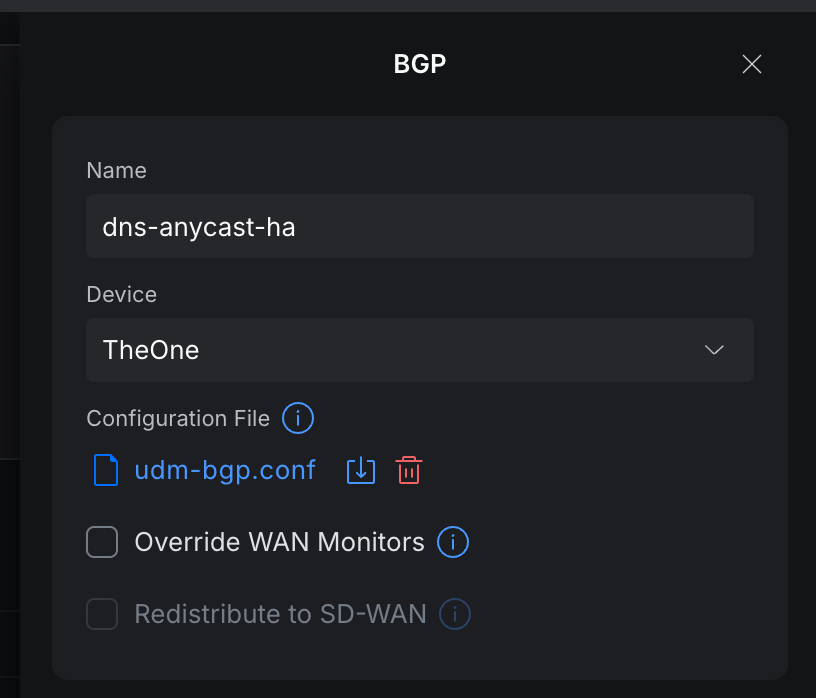
The UI is framed around WAN/ISP eBGP ("External Source (eBGP) / ISP / Interconnect"), so ignore that framing. The uploaded file defines the neighbors, and internal eBGP to your LAN hosts works fine.
Two things worth calling out:
- Use the UI upload, not SSH hand-editing of
/etc/frr. The UI-managed config survives firmware updates. The manual hack does not, and you will forget you did it right up until the next update wipes it. - Peer against the gateway's shared LAN IP (
10.0.0.1). In a Shadow-Mode HA pair, that IP stays constant across a gateway failover, so the BGP sessions just re-establish on the newly active gateway.
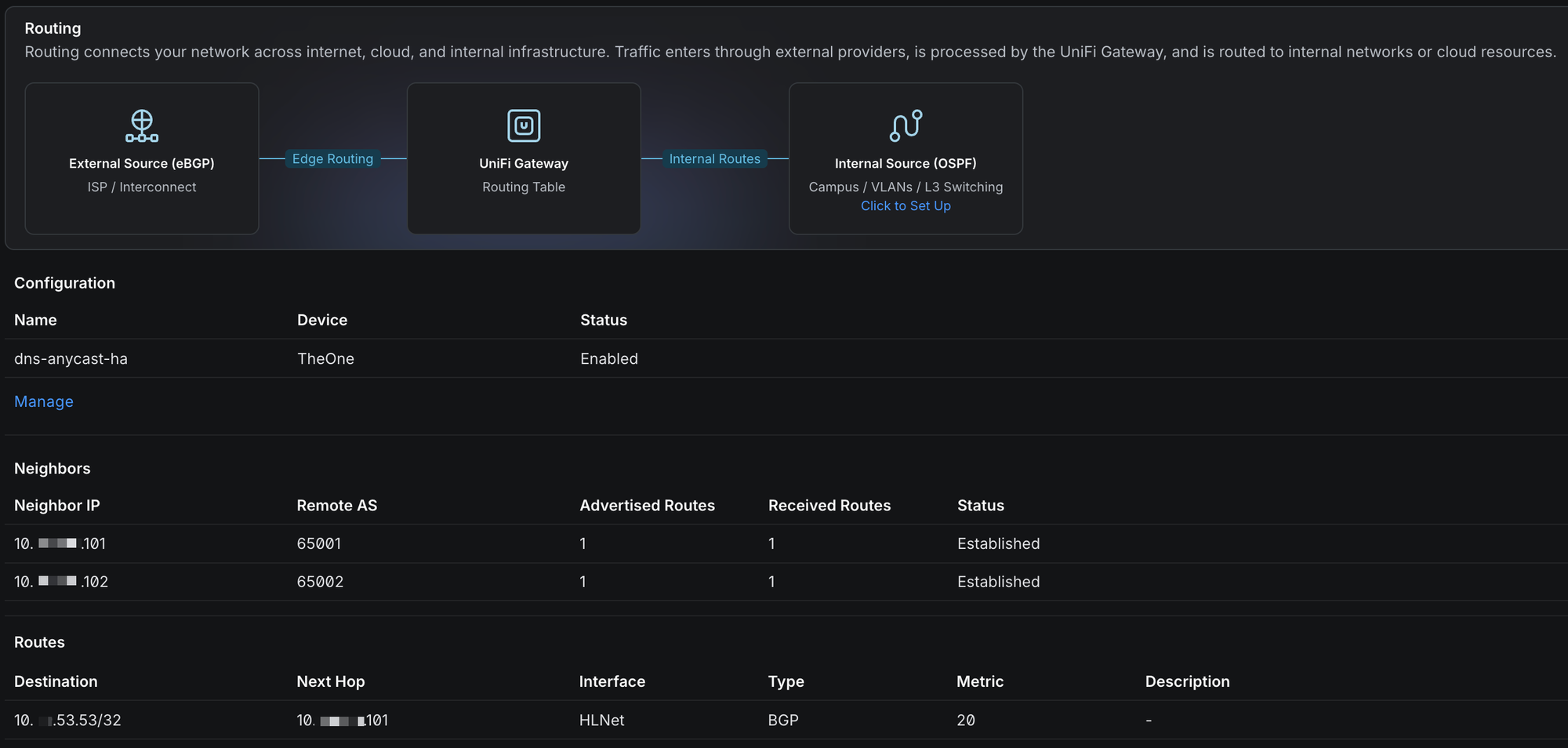
Within a minute, the UI showed both neighbors Established and the route installed: 10.0.53.53/32 via 10.0.0.101 BGP. Primary preferred, exactly as designed.
Gotcha: your DNS block rule will block the new VIP
If you block public DNS (and you should), your first queries to 10.0.53.53 will time out. The VIP isn't part of any network UniFi knows about, so the zone-based firewall treats it as External, and a "block public DNS" rule drops it. To prevent this, add an allow rule for destination 10.0.53.53 on ports 53 and 853, TCP and UDP, from each client zone, above your block rule.
Part 5: Make it so
The manual part: change each DHCP Server DNS (and every static config) to 10.0.53.53, and only that.
Do not hand out a real box IP as a secondary resolver. If you do, clients will happily use it and bypass the entire HA mechanism, which is the exact bug we set out to kill. One anycast address, nothing else. The old primary stays reachable by its real IP the whole time, so there's no rush. Migrate at your leisure.
The tertiary I deliberately didn't build
The obvious next question: what about a third fallback to public DNS for when both AdGuards are down at once? You could run an independent forwarder on a third box, advertising the same /32 with the worst BGP priority, so it only wins when both AdGuards withdraw.
I thought about it, and I skipped it on purpose. The only failure it covers, both instances down simultaneously, almost entirely overlaps with scenarios where a tertiary wouldn't help anyway: the whole rack is down, the internet is down, or I'm doing poorly-timed maintenance. The two instances already sit on separate hardware and separate power. The one real residual risk is a bad config syncing to both, and the recovery for that is "fix the primary, let sync repair the replica in five minutes," which needs no standing infrastructure at all.
Adding a third always-on box (and babysitting a keepalived Pi just in case) is a lot more to maintain for a sliver of extra coverage. It's a homelab. I have a day job. YAGNI.
The gotchas, collected
For the skimmers and future-me:
- TLS breaks
adguardhome-syncover HTTP. Force-redirect to HTTPS makes the sync tool choke. Point the replica athttps://directly. - Health-check a local rewrite, never a public name, or an internet outage takes your whole DNS plane down with it.
- An off-subnet anycast
/32zones as "External" in UniFi's zone firewall. Explicitly allow it per zone, on ports 53 and 853, above your DNS block. - Match firewall DNS rules on port, not the DNS app object. DPI can't classify a TCP SYN, so app-based rules behave differently for TCP and UDP.
- Bind the VIP to
lo, notdummy0. It works in containers too. - Use the UniFi UI for BGP, not SSH. The UI config survives firmware updates.
Wrap up
So there it is: a DNS layer that fails over in the gateway's routing table instead of fighting ARP, keeps per-client visibility and local rewrites intact, gives identical answers on failover, and has no single point of failure. All of it built from a couple of AdGuard instances, FRR, and a gateway that already speaks BGP.
The best part is how boring it is now. When the primary dies, nobody in the house notices, and I find out from a log line instead of a chorus of complaints. That's the whole point. Maintenance when I want to and still try for triple nine (at least that's what I tell myself 😉).
If you've got a BGP-capable gateway sitting in your rack, you're most of the way there already. Give it a shot and let me know how your failover testing goes. May all your hobbies turn into part-time jobs.
Read more about my HomeLab DNS saga
 Chris Kirby
 Chris Kirby
 Chris Kirby