Myco Cortex - lifecycle-driven project intelligence for your agent harness
Cortex is a set of features in the Myco package designed to provide your agent harness with instructions, project context, and codebase knowledge as the agent works and you interact with it. I'll break down each of its components, how it works, and how it integrates into your harness lifecycle

This is the second post in a series discussing my research and development into solutions for building better, faster, higher-quality, and more secure code with any agent harness, solo or with a team. Before we dive in, let's briefly reflect on how we've traditionally approached this and look at how some companies and teams are adapting with agentic AI. Over the years, we've developed all kinds of processes, frameworks, organizational structures, and team roles to solve for the better/faster/quality challenge. Agile software development, 2-Pizza teams, EM's, reporting to Senior EM's, reporting to Directors, Staff and Principal engineers, with TPM's, PM's driving and supporting. Now, in the agentic era, companies are experimenting with compressed processes, dropping ceremonies, flattening organizational structures, and widening team roles, emphasizing reasoning and architectural skills with a generalist scope. This shift in how we, software engineers and engineering leaders, work fundamentally changes how we think about product knowledge, codebase knowledge (sometimes called tribal knowledge), and even code quality and automation. Skilled agentic practitioners are not writing the code; the models are very good at that now. They are applying patterns, rules, skills, and procedures to make critical architectural decisions. Your role now is to think through and around solutions, as Models will fixate on patching and narrow scope. You must think in patterns and architecture, whereas models will only seek what they consider the most efficient solutions. Combining the agent's reasoning with your own to develop a complete solution. Now you add a multiplier to that as you're driving several threads at once and almost unlearning what you spent a career mastering: deep focus, long mental debugging sessions, and even careful architectural planning. We now must keep those skills, set them aside, and master moving in and out of product context, spec building, rapid decision-making, continuous review and rework cycles, and, with that, codifying those practices so agents can work on your behalf autonomously. Now do all of that with a team, teams of teams (humans and agents), with improved quality, security, and release cadence. For companies all-in on agentic AI, this is the reality now, and it's not one most are prepared for.
This is a hard problem, and I love hard problems like this. There are so many AI Influencer YouTube videos that say, "Solved it!" "Do this to 10x!" "This skill changes everything!" There is, of course, truth to some of it, even though it reads like click bait. It's a puzzle everyone is trying to solve, with the pieces changing daily. Harnesses are improving their ability to organize and retrieve memory; they are also advancing their own system prompts, increasing context window size and efficiency through caching, improving compression, and getting faster while "reasoning" more. We layer into that our rules (AGENTS.md), skills, and tools, which the agent will "re-learn" each and every session, like an operating system you boot up, do a series of tasks, shut down when done, and repeat. Agent sessions are ephemeral; treat them that way. Now, I don't see this as a bad thing; it's actually incredibly powerful if you understand this and focus on working with it rather than forcing old patterns into this new agentic world. Modern harnesses are highly extensible, with a full set of lifecycle hooks, protocols for standardized tool access (MCP), native exploration and execution tools, and native workflows such as planning mode and code reviews. My goal with Myco is to enhance and augment the already powerful coding harness. A fun example would be something like Spider-Man's suit (The Tony Stark version). Without the suit, Peter Parker is still Spider-Man, but with the suit, he's faster, stronger, smarter, and more resilient. So can we tap into all those senses and enhance them? If so, can we build faster, smarter, and more reliable solutions, too? That's the hypothesis for Myco's Cortex features, which serve as the connection to those senses.
In my first post, I talked about data capture. Capture in Myco is automatic and universal. If Myco is installed and you start a supported harness, Myco will provision your project locally and begin capture immediately in the background, with zero-touch configuration. Data capture in this context is the work being done by your agents, all of their reasoning, all of your initial prompts and steering prompts, and all of the tools being used and their results. This telemetry is the foundation for the enhanced nervous system we want to build. So let's talk about what Cortex is, how it works, and see it in action with real sessions driving real outcomes.
Myco Cortex
Cortex is a collection of features in the Myco package designed to provide your agent harness with instructions, project context, and codebase knowledge in real time as the agent works and you interact with it. I'll break down each of its components, how it works, along with where and how it integrates into your harness's lifecycle.
Injection lifecycle
Most harnesses offer points in the lifecycle where plugins and integrations can inject relevant information into the session context. The most common points are on Session Start, Subagent Start, after you submit a prompt, and, more rarely, before a tool is executed. The most popular, Claude Code and Codex, support all of them, but you'll see broad support for the first 3, including open-source harnesses like OpenCode and Pi, and in the enterprise with Copilot and Antigravity. See the full list at myco.sh.
Instructions
When enabled, Cortex will automatically inject a compact set of instructions to inform the agent of its enhanced nervous system, explain what it can do and what you can do with it, and provide a quick sit-rep. These instructions are fully generated by the Myco Agent harness (more on that in an upcoming post) to ensure they're always accurate. Here is a live example from the Myco project itself, where I dogfood Myco, and another from my unifi-mcp project. You can see that the content is largely the same, since it is generated by the same harness using the same prompts and tools, with only recent workstreams varying.
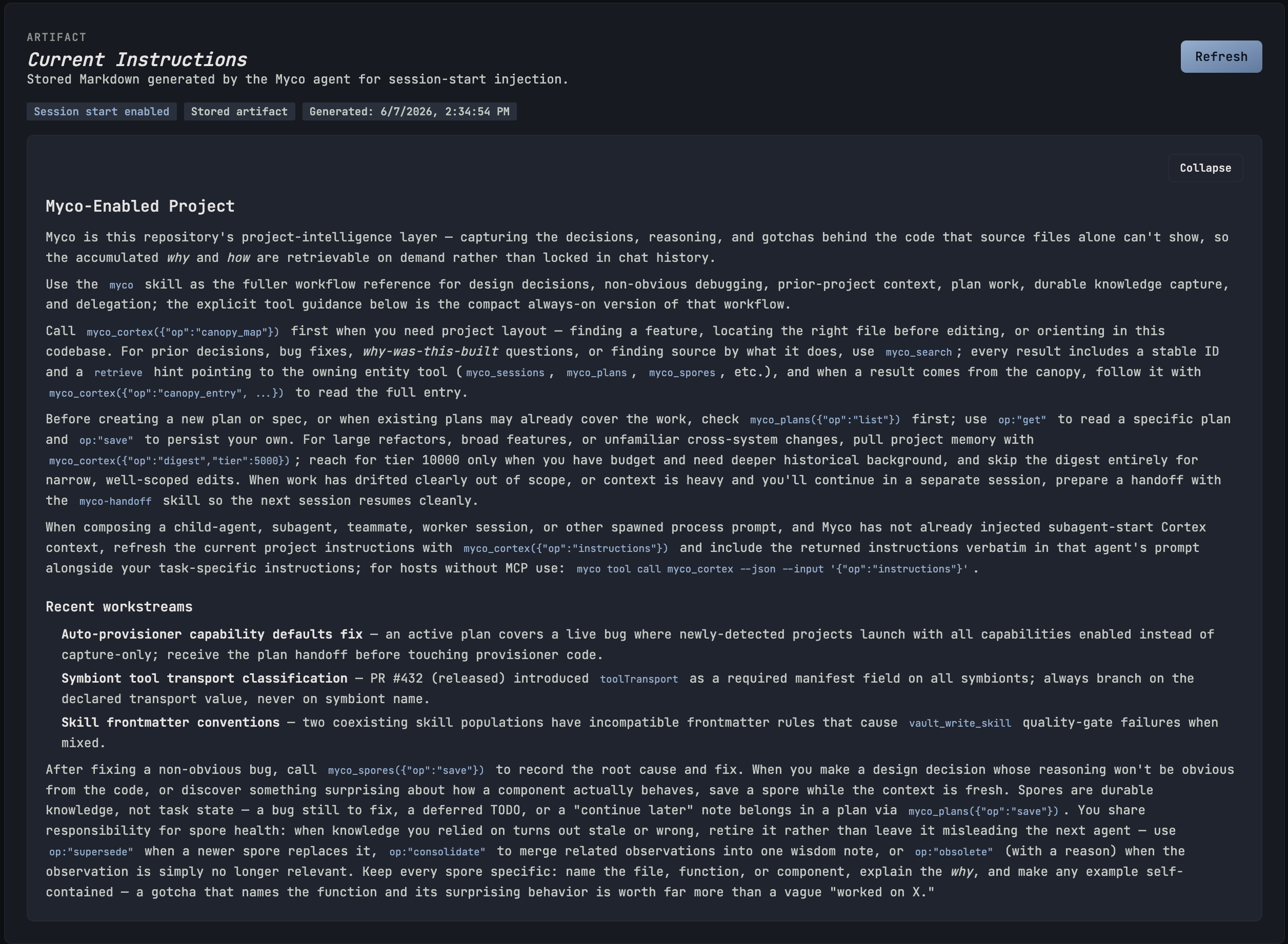
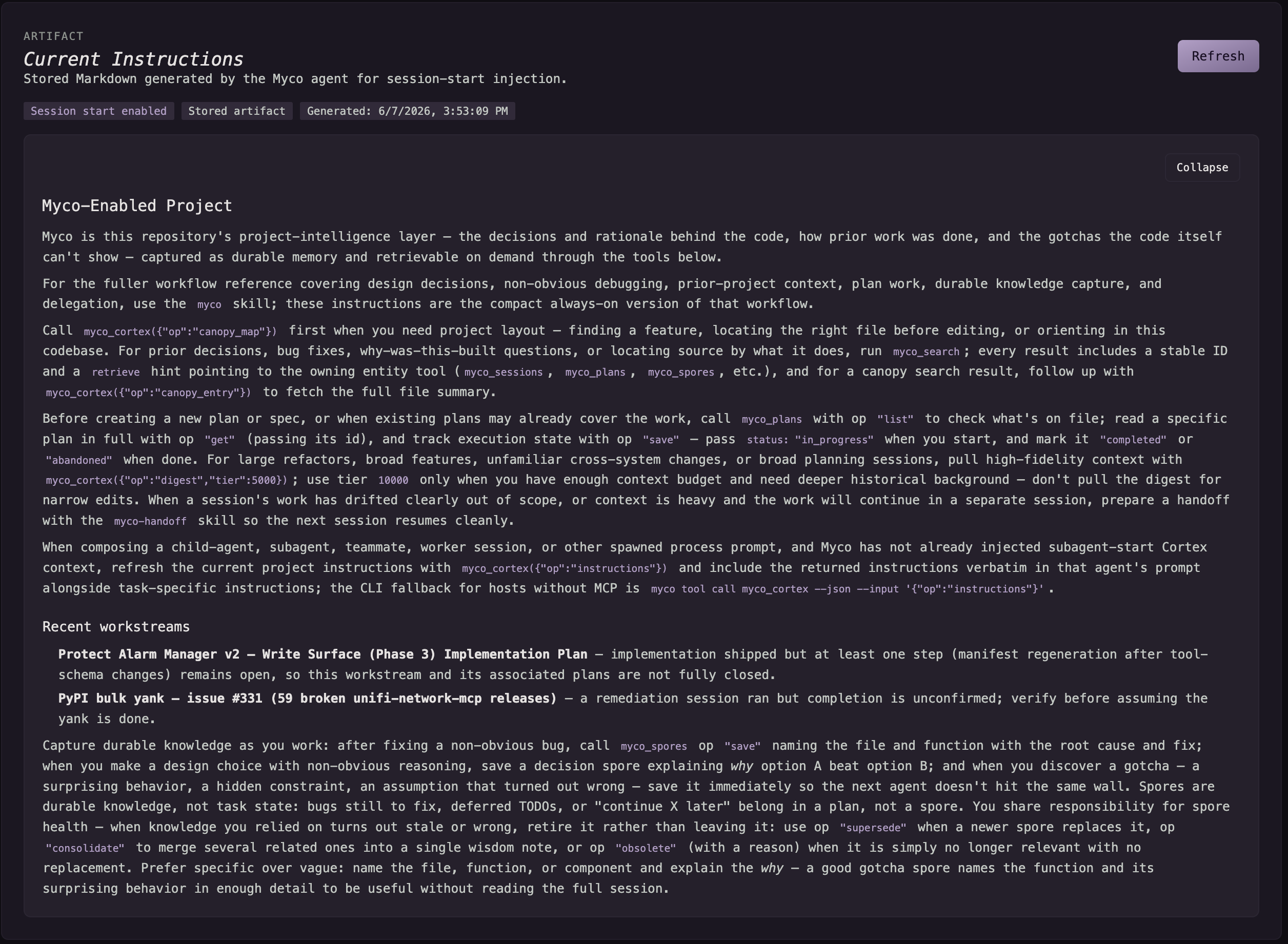
Instructions can also be used with subagents and team agents. Often, when doing complex work with your harness of choice, it may choose to spawn subagents. This is a very effective pattern when building large implementation plans or any set of scoped work. It's also effective for context management, as each subagent will operate with its own process and context. Since it operates in a fresh context, it will have only the information provided by the primary or orchestrating agent in its initial prompt. Myco will still collect all work performed by this subagent; however, the subagent will not know about Myco explicitly. For harnesses that support this injection point, we simply provide the subagent with the same instructions (slightly tweaked), so it too can choose to tap into the project intelligence layer. For those harnesses without this (about 50/50 of the popular ones), we also have a short paragraph in the primary agents' instructions that tells them to enhance their subagent prompt with Instructions. Myco may also tailor some content to specific agents. For example, here is a recorded injection for Codex, where we asked it to start working on a plan built in another session:
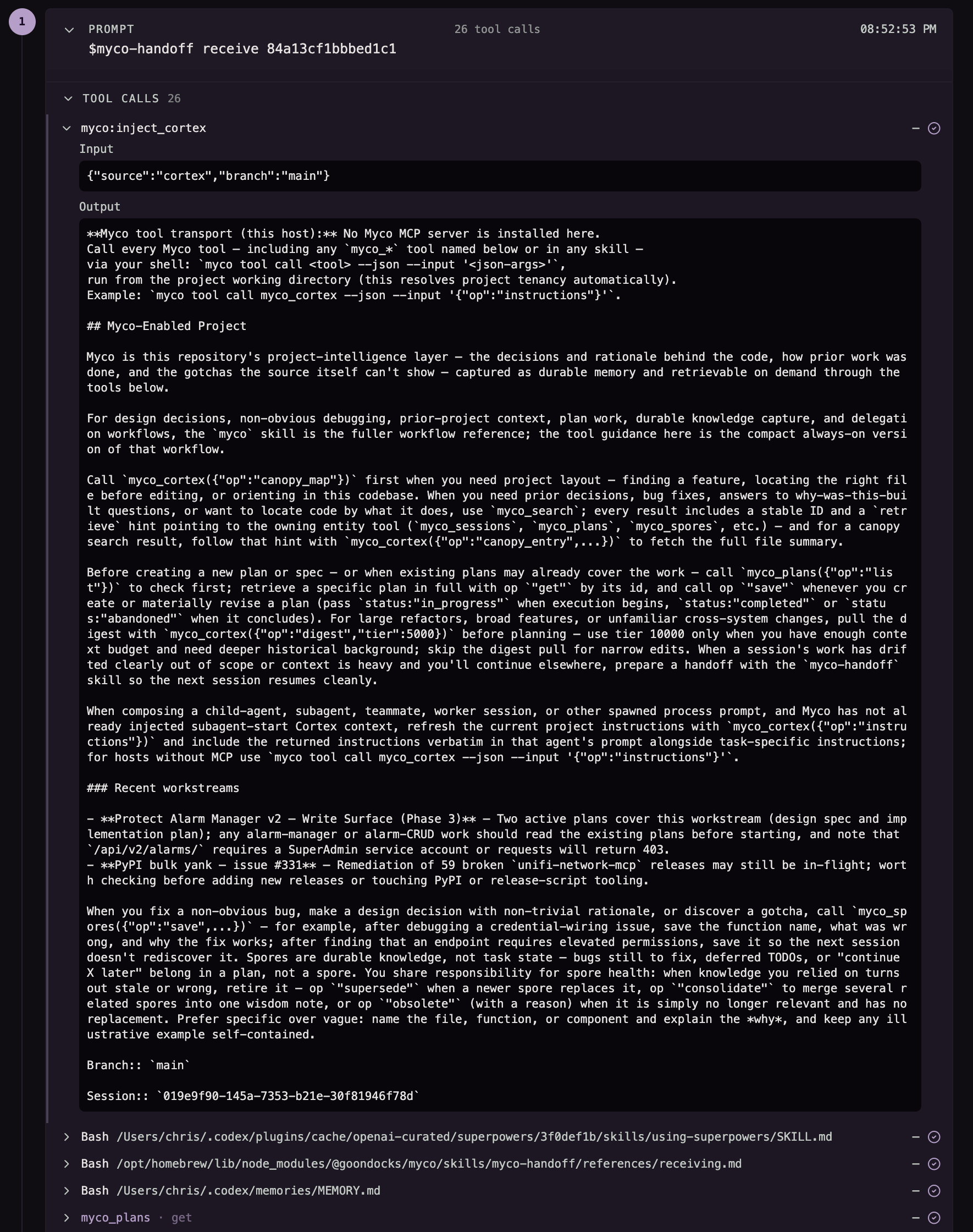
There are quite a few things happening here, which can give you a sense of how the intersection of knowledge, tools, context, and planning can work symbiotically between Myco and your agent harness. I'm starting the session with a built-in skill, which allows me to seamlessly handoff a plan from another session (captured with myco using harness native planning), it then tells Codex, "hey you don't have MCP for these tools; you should use the CLI", which is customized for Codex (which supports MCP, just not for myco, as we cannot determine project tenancy from the global mcp server install), then all the tools, sit-rep, what branch they are on, and its session id. As part of the handoff, the plan may also tell the agent to load recommended skills (like using-superpowers). It then consults its own memory, grabs the plan from myco, and gets to work. Oh, it did a great job too btw 😉
Spores
Spores are the living knowledge of your project. They are created and maintained by the Myco Agent harness and by the coding harness you are using. They represent active decisions, gotchas, discoveries, and bug fixes. As themes and groupings start to emerge, Wisdom spores are created. Similar to us humans, Wisdom is gathered from experience...three different angles of the same gotcha? We are wise to it now, never again. Spores can be active, be superseded by new or updated Spores, and then become obsolete. Spores are the collective knowledge and history of working on and building your project. You can search for them semantically via a local vector store, and agents can find and access them through tools. In Cortex, semantically relevant Spores are automatically injected into the session context after you type your user prompt, providing your agent with the wisdom it may need to be more effective. Let's see this in action! This is a session I started yesterday to figure out why Myco's MCP install for Codex was failing to connect.
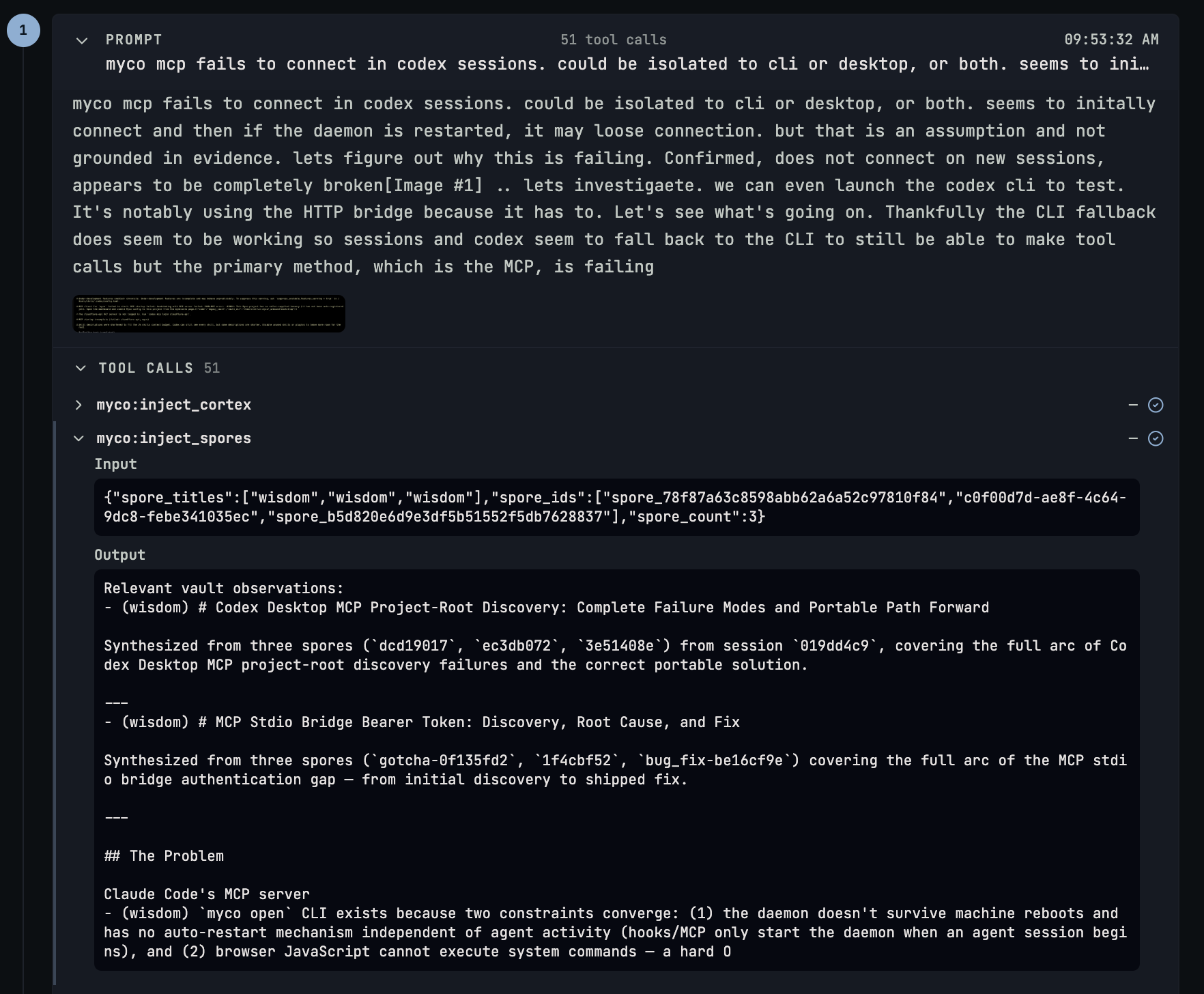
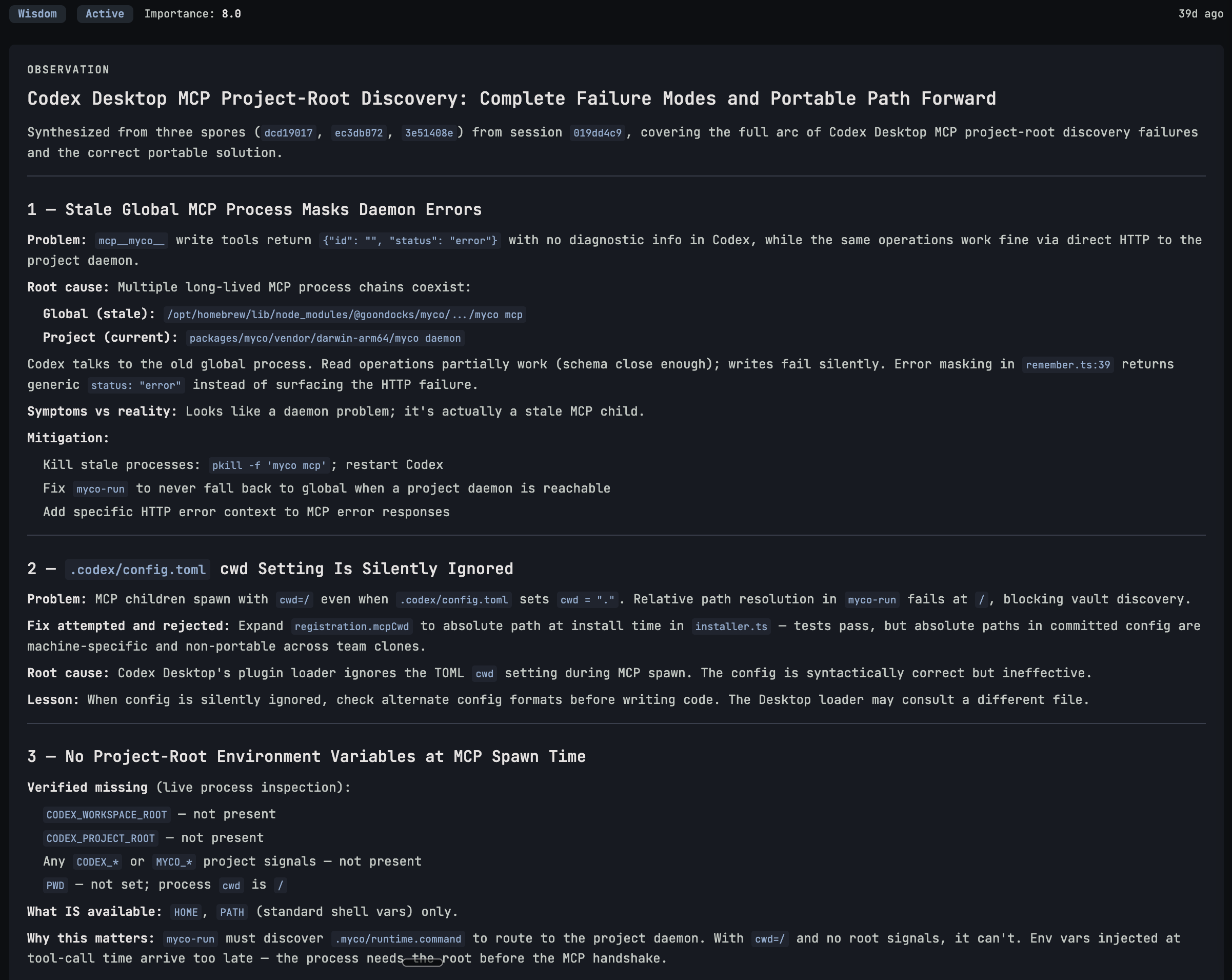
This is a Claude Code session. I'm starting with a basic debugging investigation project with an example screenshot from the Codex CLI throwing connection errors related to our MCP server. I also lazily just pasted in my notes, as the prompt could have been better, but that's kind of the point: myco fills in the gaps for me. Claude gets the instructions, and then it gets some Spores. This was a sub-second search against the SQLite vector store (all spores are automatically embedded when created or updated) based on my prompt. Myco applies a basic algorithm to determine the relevance of the search result, and if it clears that, it is then injected back into the session context. You can see by the Spores injected that this is not the first time we've had these issues (I actually forgot). We have some Wisdom from an earlier session: Codex, based on how it's launched, may not pass along knowledge of which project it's working on. We then have more Wisdom regarding the MCP stdio bridge, when it was missing authentication, so something for Claude to check. Finally, notes on the MCP server not surviving daemon restarts during a live session (this was solved a while back). So all relevant experience to the task at hand with a rich set of Spores and session references for Claude to investigate, along with its own native tool calls. Spore content can be rich and detailed (as shown), so we provide the agent with a brief overview and a reference to retrieve more details. The goal is the highest relevance with the fewest tokens.
Digest
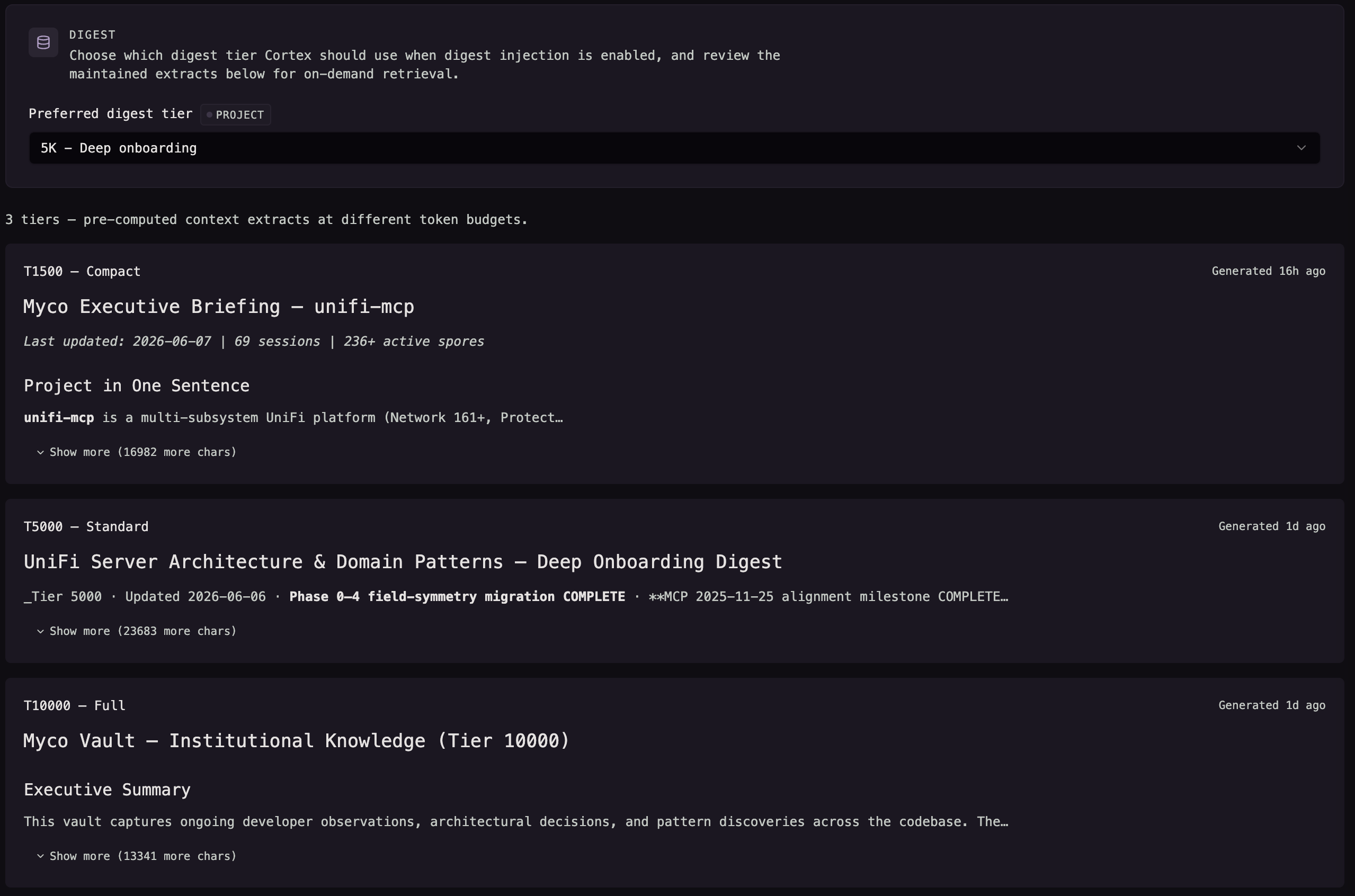
The Cortex Digest is an actively curated and maintained set of compressed project knowledge that agents, or humans, can use to onboard quickly, possibly circumventing the need for lengthy manual exploration and discovery. There are three tiers. T1500 "Executive Briefing", T5000 "Deep Onboarding", and T10000 "Institutional Knowledge", where T{Number} represents the amount of tokens the Myco Agent targets when writing and maintaining them. This is a very rich source of knowledge that remains on tap at all times for the agent to access via the Cortex tool, and it can also be automatically injected into your session context if you opt in. This can be used in combination with Instructions for rapid onboarding for one-shot prompts or in place of instructions to leverage the knowledge, but let your harness lean on its native tooling instead of being biased towards Myco.
Canopy
Canopy is your project's live code index. It maps your entire codebase, analyzes all relevant project files, describes each file, and embeds that metadata (not the file's contents) into the local vector store for easy retrieval and injection. Like all Cortex features, this is not designed to replace the coding harnesses' native code exploration tooling; it's meant to enhance it.
Let's start with the Canopy Map. The map is the context-rich cheat sheet for coding harnesses to quickly orient themselves to the project. Rather than general exploration, they can reach the target area after a single tool call that tells them where to go. It's not just a directory tree; it provides high-level structural guidance, but more than that, it offers semantic knowledge of those files. Not just where the API is, but what it is. You have a GraphQL and REST API located in apps/api; here are the key areas to pay attention to, along with key files in those sections. Updating your CI workflows: where the workflows are and what each one is responsible for. Working on architectural patterns? Here is what's in use today and how it fits together. Adding a feature? Here is what a good feature looks like.
The instructions tell the agent about the map, why and when to use it, and in my experience, they will use it more often than not, getting the solution faster. Maps are generated by the Myco Agent from the live code index, Spores, and actual project contents. You had two sessions today. When complete, the Agent gets to work reasoning, distilling, and updating your Map so that it remains current for your next session. The best way to understand it is to see it. This is the full and complete live Map Myco generated for the unifi-mcp project
The above Map is, in part, generated from the Canopy Entries. Entries are the files in your project, but Myco only captures the important bits. We don't need to ingest the file's contents; your agent will handle that, and it's always changing anyway. We want to know where it is, what kind of file it is, and what the file is for. This, along with other metadata, is then stored in the local database and embedded for semantic search. For example, when a file is first scanned or its contents change, the Myco Agent harness will "describe" the file in 1-2 sentences and store that description along with its metadata. The file apps/network/src/unifi_network_mcp/runtime.py has the following description "Provides the UniFi‑Network MCP server’s core singletons—config, FastMCP instance, and manager helpers—and exposes lazy getters for testable substitution." ...yep, that's what it does.
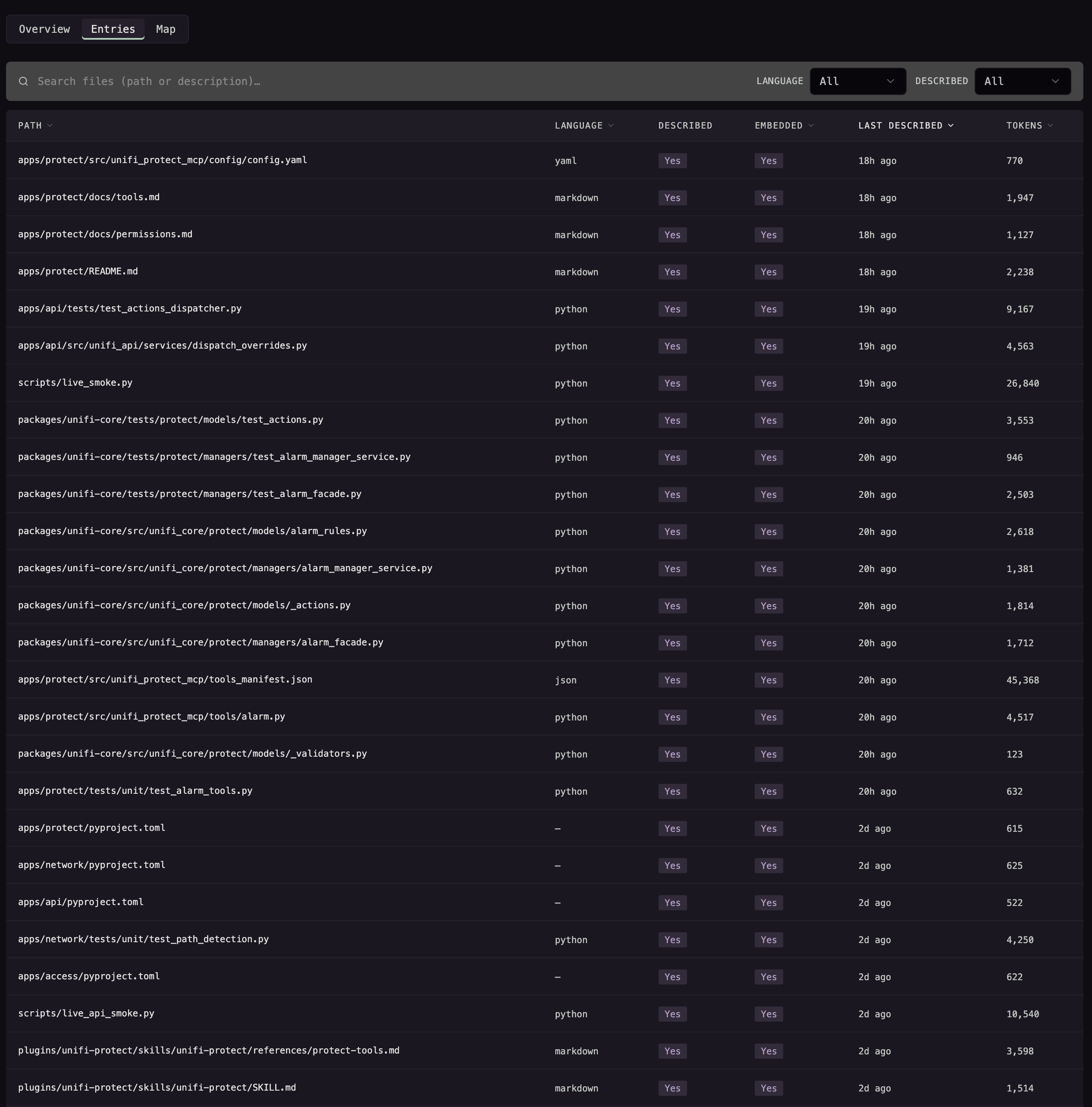
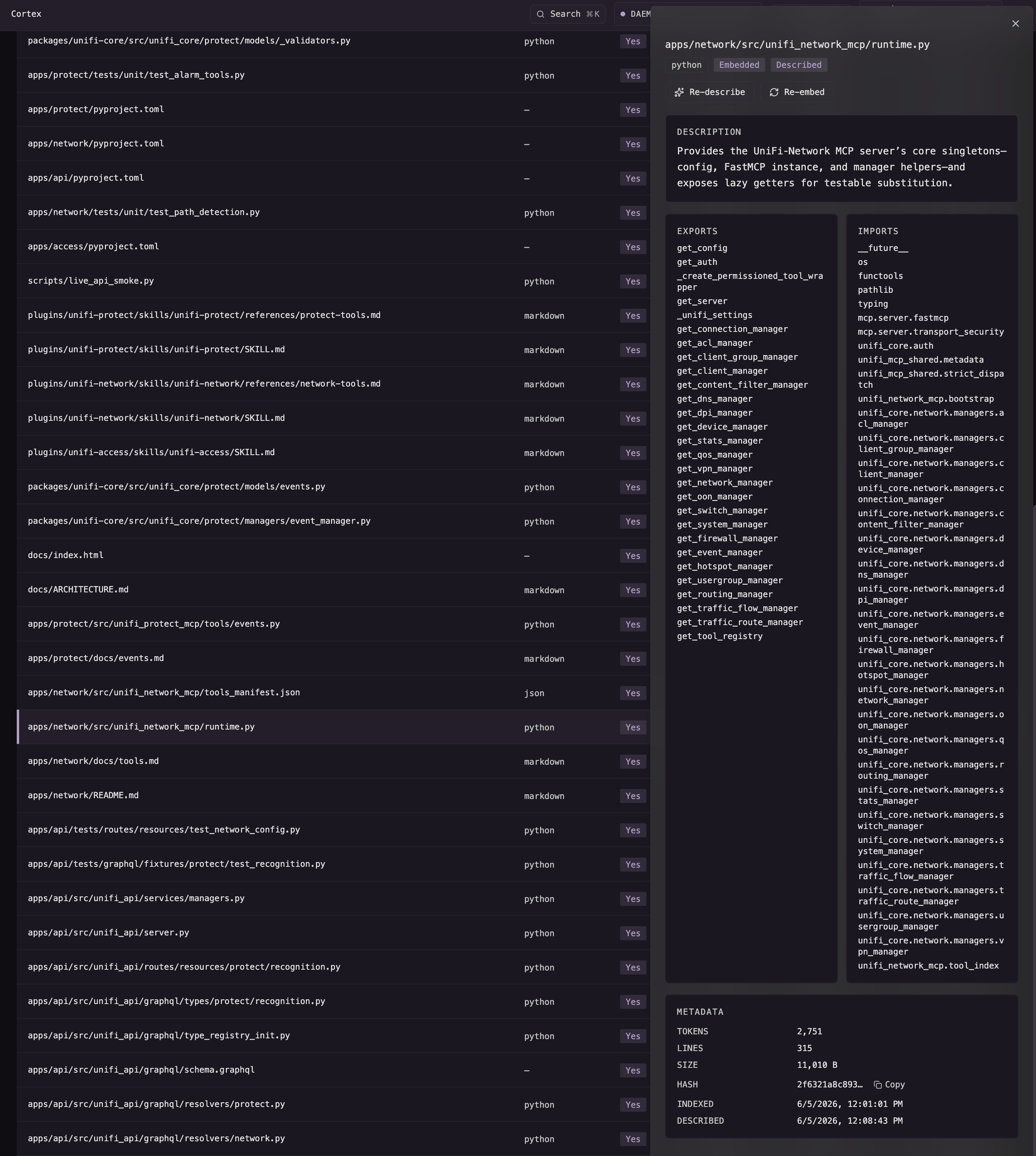
Now, for Agent harnesses that support it, we can also use canopy data to inject it back into the context before a file is read, allowing the Agent to skip the read and save the tokens. Canopy tracks this as token savings, which not only can improve the speed of your work but also save you some money. Let's now see how Entries and Map are used in a live session. This is a recent session for unifi-mcp, the same session from earlier in this post, where we are investigating some API changes in the UniFi Alarm Manager and updating our mutating tools based on that investigation. This is a complex task; we are navigating legacy private API's and a new V2 api surface, abstracting that knowledge from the tool surface and grounding this work in real data gathered from Playwright, and applying that knowledge using established patterns that will be fully tested, unit and smoke, without introducing regression. aka, product development and software engineering. To see it in action, let's look at my first prompt again, which, if you remember, was a plan handoff from another session that Myco will facilitate. After the agent finishes reading and updating the plans (there are 4 of them), it orients itself by requesting the Map, decides what to do first, then pauses for a Human-in-the-Loop to proceed (as instructed by the handoff skill), and the work begins.
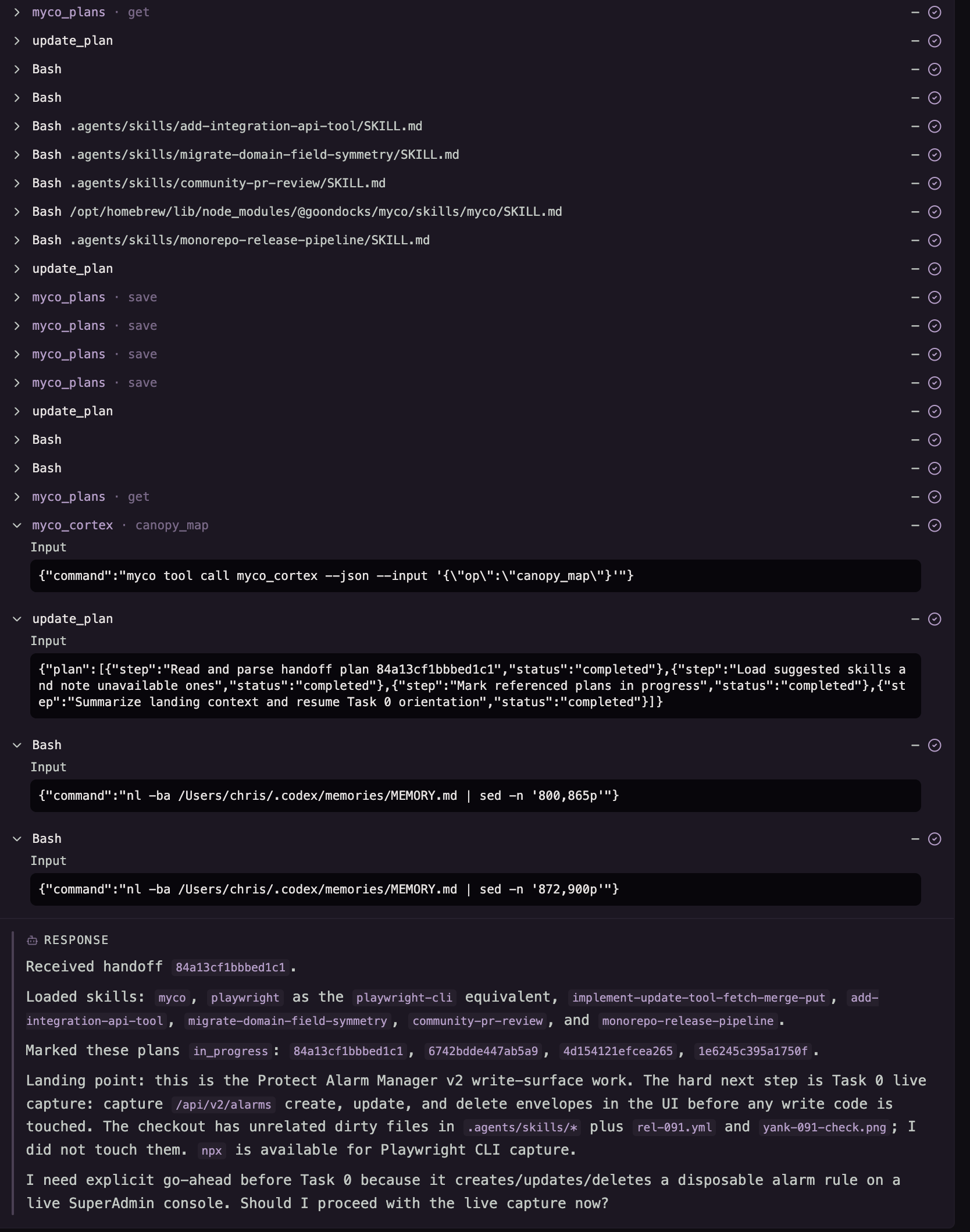
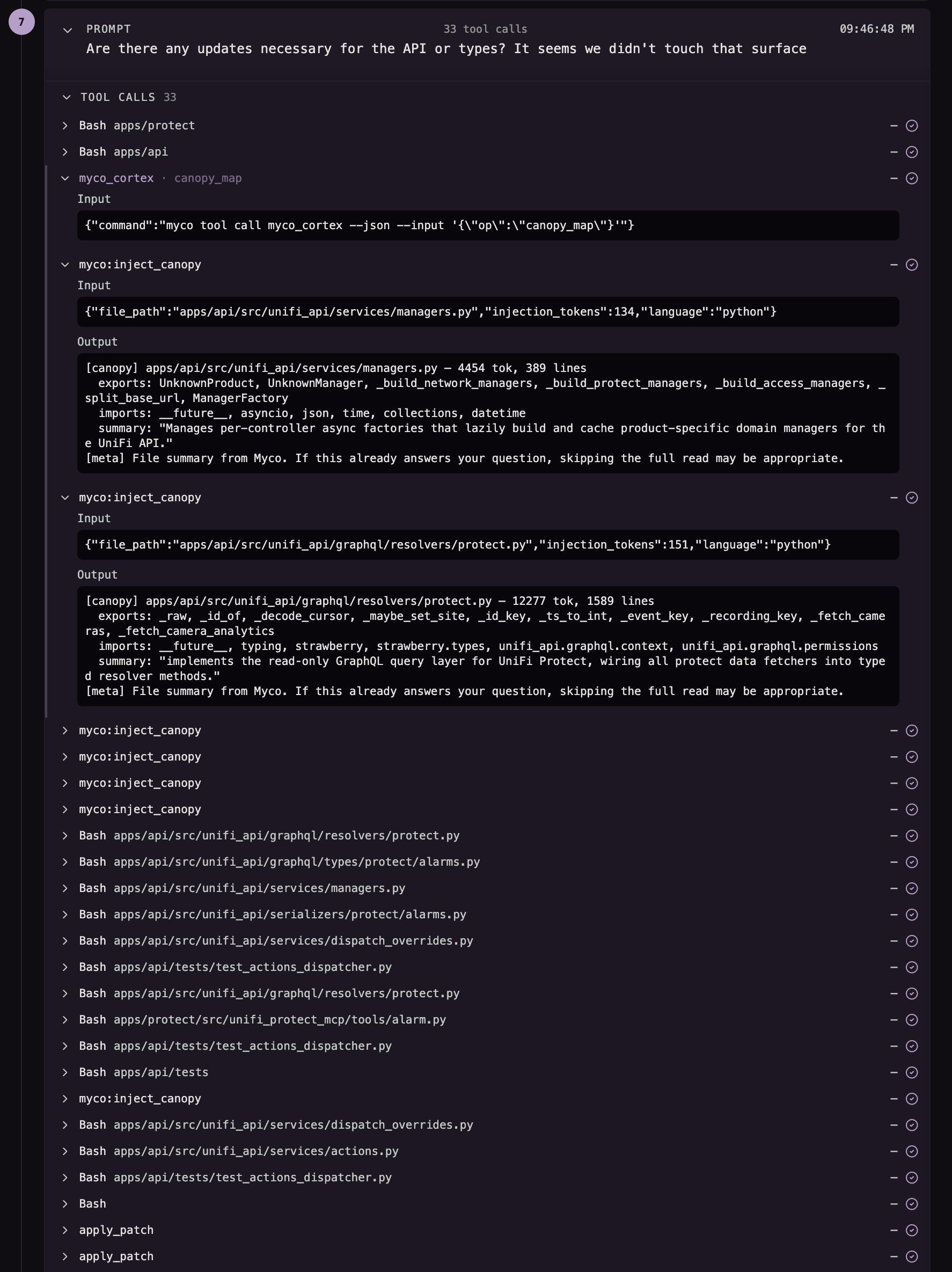
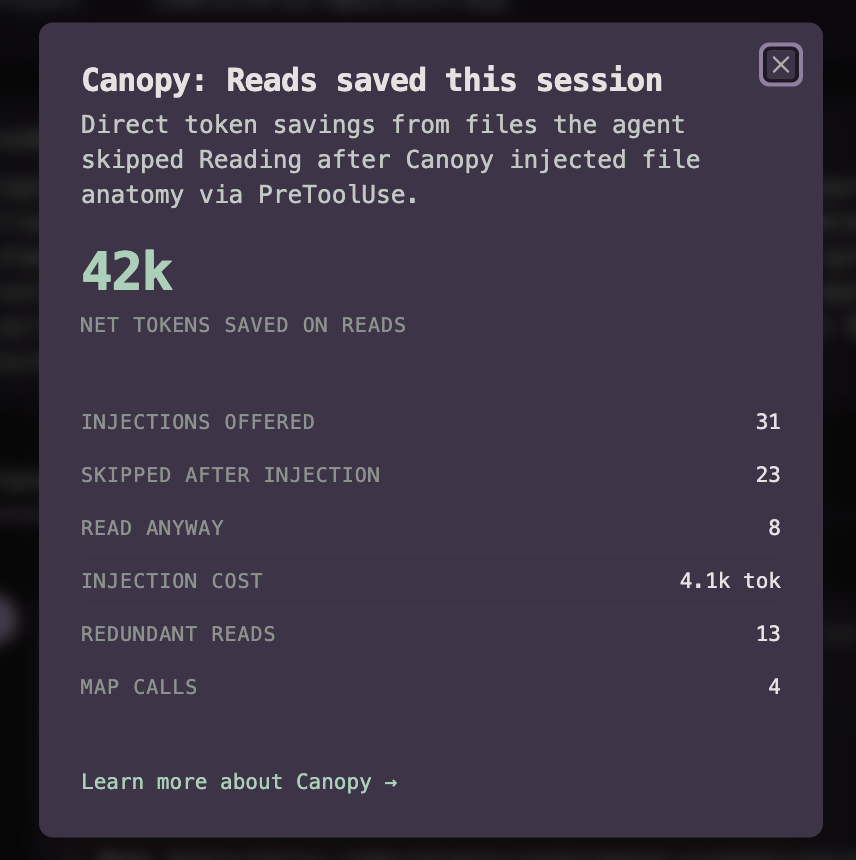
Codex, in this example, calls for the Map 4 times throughout the session. Myco also opportunistically injects canopy entry context while Codex is actively exploring files. As you can see above, we provide metadata, file imports/exports, and a description, along with a note encouraging the agent to skip the full read if they have what they need. For this session, an estimated 42k tokens were saved through agent read skips. This is rough and not precise; it also does not yet account for Map reads and exploration tokens saved. We'll dial this in as it continues to prove useful. Canopy never prevents a read and aims to be as efficient as possible, which in this case is estimated at 10x efficiency.
Wrap up
Give your smartest engineer the most complex work on an existing project they've never worked on, and tell them they have an hour to build, test, and ship it. They know how to code anything, in any language, using any pattern. They have no idea what language the project is in, its patterns, its rules, or, more importantly, why that language, those patterns, and those rules. It's almost silly to write that, but it's true. Every time you fire up the harness, your smartest do-anything engineer, this is the reality. Nothing you do today, including all of this, will teach your agent anything, nor will it remember anything… and if you happen to fill that 1M context window, it likely won't recall an hour ago. Those of us using these tools know this, and there are ways you should use these tools and ways you should not, if you care about high-quality outcomes. I don't focus on what it can't do, but rather on what it can do and is good at. It's good at code exploration; give it a map. It's curious and seeks why; tell it how to find out. Same for humans. The prompt isn't perfect; improve it with wisdom. You get it. Cortex is the result of the Myco Symbiont integration system, data capture, FTS, semantic search, MCP server, and the custom Myco Agent harness. So there is more to share and see over on GitHub. May you forever have double usage on your Max plan. See you in the next post.