routr - balanced orchestration across coding harnesses
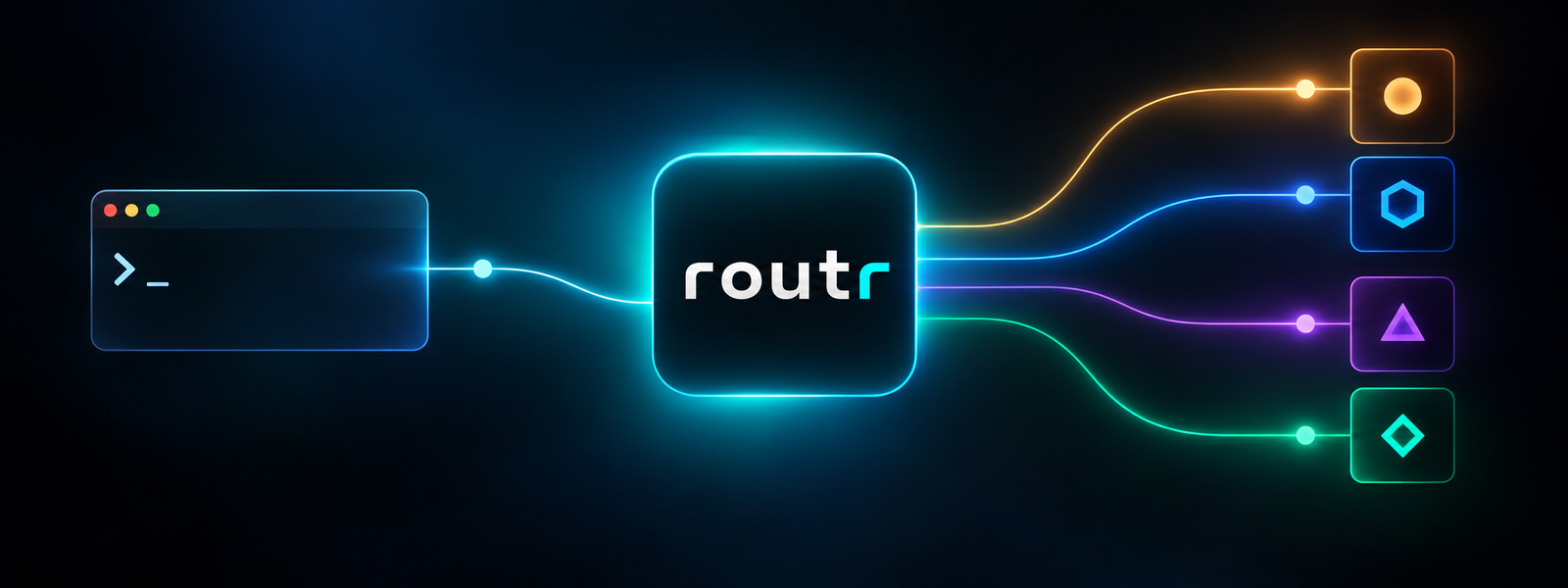
Tokens are expensive. Subscriptions are getting nerfed, and the monthly pricing is going up. No single subscription can support a professional developer's workload, and you shouldn't limit yourself to one frontier harness and model. Many of the tools I build are for this purpose: high-quality professional development on personal budgets. I also don't like vendor lock-in, and I want to leverage what each tool excels at, without compromise. So I set out to answer a question: can I combine decision models like Jev with agent-native terminal multiplexers like herdr, and orchestrate a single piece of work across multiple subscriptions based on how difficult the work is and how much headroom I have in each of my subscriptions? Um, yeah, you can; it works better than I expected.
routr (because names are hard) is the tool I built to test this hypothesis, and I've been using it for the past three weeks on all my personal and work projects. I heard the hype around Jev, so I decided to try it out. I quickly found that by analyzing my own raw transcript data, I could develop, validate, and tune a set of questions that could simplify how an agent decides how to do the work you've asked it to do. What is Jev? It's a System One model, and if that name is new to you (it probably is), the name comes from Daniel Kahneman's Thinking, Fast and Slow. In TypeSafe's words, System One models are "built to make fast, structured decisions that software can use directly." Like an LLM, One understands natural language, but it "returns typed decisions and probabilities rather than generated text." So the LLM is the slow, deliberate thinker, and the System One model is the fast, calibrated gut check. Once I had those questions, I built the CLI tooling and the orchestration skills for efficient subscription burndown that support cost-effective, high-quality, long-running builds. In this post, I'll walk through why I built it, how it works, and what three weeks and 160-ish dispatched jobs taught me.
One subscription running hot
My, and likely your, weekly problem: controlling the burn. On a long-running project, I'd give Fable 5.1 a big task in Claude Code (because Opus 5 was terrible) and let it work. Either I'll ask it, or it decides when to spin up subagents, and sometimes it decides those subagents should also be Fable (well, all the time). Fable burning Fable, all on a single subscription, and your week is gone in two days. Models are getting smarter now, but evidently not fast enough. You've selected the model you want to use. It tries to parallelize work, but it doesn't consider how difficult it is. How much intelligence does it take to complete the work? How fast are you burning down your subscription? It doesn't think about it, but you certainly do. Anthropic's happy to sell you extra usage, so is OpenAI. There's very little incentive on the frontier to optimize this way. Another way to put it: your token usage is only as efficient as the model, reasoning, tools, skills, and prompts you use to do the work. As the frontier matures, less is more.
When I measured it, subagents accounted for about 43% of the cost of sessions that used them, and 58% of those subagent runs used Opus or Fable. Honestly, Sonnet would have been the better choice for much of what it was asked to do. I ended up instructing Fable to only use Opus for subagents, which helped the burn but didn't fix the decision-making. It just dropped my scold into the MEMORY.md.
Meanwhile, I'm paying for multiple subscriptions. Personally, I have the top-tier Claude Max and Codex Pro plans, $20 Cursor Pro, and $20 Google AI Pro (Antigravity). At work, I have enterprise seats on several of the same vendors. So one subscription runs hot while the others sit mostly idle, or you bear the mental load to balance them as you work. It works, but it could be significantly more efficient.
Before routr: herdr, and a lot of prompting
I was already running multiple agents side by side with herdr, a terminal multiplexer built for coding agents. herdr is awesome and does most of the heavy lifting for orchestration tools. Herdr facilitates communication between panes, pane spawning and closing, etc. Essentially, it provides all the plumbing you need to run your agent team without tying you to any single harness.
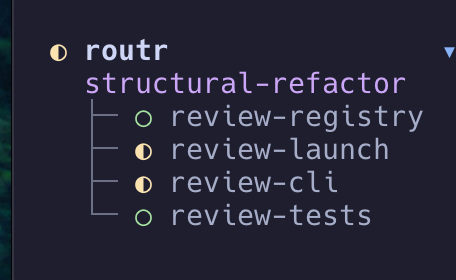
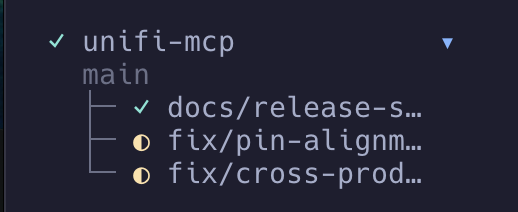
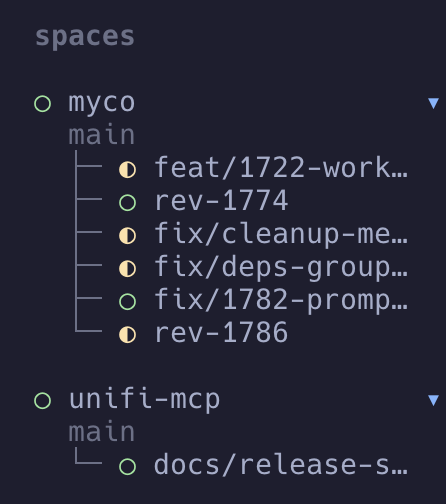
The images above give you a sense of what Herdr looks like inside. In these examples, the main session in this orchestrator typically runs Opus 5.5 or GPT-6 Astra, and each nested pane runs a mix of other harnesses. For me, those are typically Codex, Claude Code, Cursor, and Antigravity, which are all installed and logged in on my machine.
The routr I didn't build
My first instinct was a formula. The early prototype had 47 "lanes" (every model at every effort level), each with a capability score and a burn score, all tuned in a config file. It worked...for about as long as it took me to realize I'd have to retune it every time a model shipped. I killed it. Complex cost-efficiency equations that change as models improve would quickly make the router irrelevant. Plus, with harness and model innovations happening daily, I didn't want to get in the way. This had to provide standalone value.
I also tried benchmarking models against real issues from my unifi-mcp history, my most active personal project. Haiku passed 2 of 12. Sonnet failed the same hidden tests because they encoded design choices only I, as the maintainer, knew. I stopped before spending another 20% of my sub on the Opus run analysis.
The lesson was to reframe the questions. A router will never know whether a model is capable enough, because models change all the time. What it can do is read the work itself. Is the work broad in scope? Is the approach open? Is the cause of the defect unknown? Is a mistake hard to reverse? Those are questions a System One model answers quickly, with a confidence score a traditional LLM can use to decide.
How routr works
A decision model judges the work. routr asks a System One model a set of tuned yes/no questions about the brief, and gets calibrated probabilities back quickly. Today that's TypeSafe's Jev, which answers in about 300 ms or less. From those answers, routr advises a level: basic (well-specified work, so a small, fast model is enough), standard (the worker has to find something out or choose an approach), or strong (a wrong or shallow result would be expensive and hard to notice). The decision model knows nothing about your subscriptions or your routr config settings, and that's on purpose.
routr lists the harness candidates and their capacity. This part is simple math. It reads what's left in each subscription's usage windows, subtracts a reserve you set for each supported harness, and calculates available headroom. The same inputs always give the same answer.
The orchestrator decides. Your smartest model stays the judge of judges. It reads the advice and the capacity, picks the harness, model, and effort, and judges the result. routr is biased towards quality: it chooses options it trusts to deliver a verified result, then weighs efficiency and capacity among those. If the decision is on the fence, routr's skills ask the orchestrator to level up. Ultimately, the orchestrator decides, and that's exactly what you want.
That's System One feeding System Two, just like the two work together in your own head. The fast model doesn't plan or write code. The LLM doesn't burn a reasoning pass deciding whether a typo fix needs Opus. The questions are the product. I tuned them against live transcripts (hundreds of them, across every harness and many sessions). If you're curious, they're all in questions.mjs.
Here's what a dispatch reads back. routr prints JSON, so this is the README's example laid out as a table:
When the orchestrator hands out work, routr launch starts the worker in a herdr pane, in its own git worktree, with the right flags for that harness so nobody has to answer startup prompts. The lead checks the report, sends rework back to the same worker, and relaunches one level up if it falls short again. Then it records the outcome in a local ledger, and routr cleanup removes the pane and worktree. The routr tooling isn't meant to replace herdr; it wraps critical functionality so orchestration can stay consistent. I found that relying on the herdr skill alone didn't give me consistent results. Which makes sense. The herdr skill covers everything herdr can do, but I'm not interested in that for this particular kind of orchestration. I need five or six things done consistently and repeatedly. Essentially: create pane, watch pane, message pane, cleanup pane, remove worktree and branch. repeat.
Why workers are better than subagents, mostly
A routr worker isn't a subagent, and that's intentional. It's a brand-new session in its own harness: a fresh context, a detailed written brief instead of a prompt improvised mid-task, its own git worktree, and the project's usual rules and skills loaded like any other session. It can run on a different vendor's model, which matters most for reviews; otherwise, you're just grading your own homework. And it can still have subagents of its own. A subagent, by contrast, runs inside the parent's harness on the parent's subscription, and what it learns comes back as a summary into the parent's context. I know sub-agents can now have sub-agents, which is great, but that only supports this pattern. It doesn't replace it. Finally, workers running in their own pane are easy to observe, far easier than subagents. Making navigating across your orchestrator and workers in herdr incredibly easy and native. routr essentially operates as the meta harness, managing multiple orchestrators that, in turn, manage multiple workers on a variety of harnesses. If that doesn't make you smile, then you're in the wrong profession 😁
But we still like subagents and routr sizes them as well. A worker that wants help asks routr subagent, and the rule is simple: start at the advice, go higher only on a fact, and never default to your own (biggest) model. Doing the same work yourself costs about half as much as a subagent, so use subagents only for work that can run in parallel, either in the worker or the orchestrator.
Getting started
routr is cross-platform and a single standalone binary, so it doesn't require Node, Bun, or packages:
curl -fsSL https://raw.githubusercontent.com/sirkirby/routr/main/install.sh | sh
irm https://raw.githubusercontent.com/sirkirby/routr/main/install.ps1 | iexroutr installs to your home directory and walks you through the setup, automatically detecting your logged-in harnesses and their models. It asks you to select the type of work and the default model you want to leverage for each, then asks for your TypeSafe API key. Adding a couple of dollars is more than sufficient for routr's use of Jev. You can run setup again anytime to modify your settings via routr setup
Your preferences matter
My setup: Claude (Opus, medium, strong), Codex (GPT-6.1 Sol, medium, strong), Cursor (Grok 4.7, high, standard), and Agy (Gemini 3.8 Flash, medium, standard). Each subscription gets a hardest work level (the hardest level you'd send it), a reserve, and a use setting (normal, or fallback for overflow). For example, I treat Cursor as standard work, with Grok as the default model, since that's where Cursor gives me the most usage.
💡 Enterprise seats. typically have no session or weekly limits in favor of usage credits and credit limits. routr treats those as metered, and you choose whether they take everyday work (--use codex=normal) or only overflow. At work, those are often your smartest, most capable subscriptions, and they're meant to be used. tracking metered usage is likely something we add in a future release to better support balancing metered seatsStart some work
Start or connect to your hedr session, launch your default harness, and prompt. You can leverage the packaged routr-orchestrate skill, or just prompt something like You are a routr orchestrator. lets build plan x. This will invoke the routr skill, which will have detailed orchestrator and worker instructions as well as the herdr skill, which router needs for managing and communicating with your workers.
What 159 dispatches taught me
I use routr at home and at work, so there's real data to look at. My local ledger has 159 dispatches from September 20 to October 11 across several of my active open-source projects. routr itself (82), Myco (38), and unifi-mcp (26).
- Where the work went: Codex 87, Claude 45, Cursor 16, Antigravity 11. (The orchestrator isn't in those numbers. That was almost always Opus.)
- How it went: 147 finished, done, and passing. 91 needed one round of corrections, and 40 needed two rounds.
- How often the lead disagreed: it went above routr's advice 34 times and below it 3 times.
My burn-down across subscriptions is significantly more even now, with improved speed and quality of work...which was the whole point. So, very encouraging, but tuning continues as we collect data.
Who it's for
Anyone building with agentic AI in the TUI. You can still leverage routr with one subscription, though you lose the balancing benefits. It works best with at least two paid subscriptions, and the benefits scale up from there.
Other things to know
- The evidence is small, but real. The level evals are one maintainer's work (me) (n = 36), and most labels were written by the people building it. I do have opt-in telemetry, which will further eval tuning. No PII is collected; all is documented.
- Workers run with full permission (
--yoloand the like), and try to bypass hook trust prompts and other nags on harness startup. I'll keep tweaking this in future versions, but for now it is mainly for convenience. You are trusting your orchestrator to manage the workers and keep you in the loop. - Usage accuracy varies. Some harnesses provide CLI access to this. Others offer usage commands that must be run in live sessions. Router manages all this with a standard contract and checks at regular intervals, but it can lag under heavy burn.
- It's built for a laptop or a private VM you check in on. It can run largely unattended (I've been doing that), but it isn't adapted for cloud agents yet, because it relies on herdr, a terminal multiplexer. The architecture could move there, but it hasn't yet.
- The decision model needs a key (TypeSafe's, today). Without one, or without a network, routr answers with your fallback level.
What's coming
I'm adapting routr's decision-model provider to support other OSS options. Cloudflare's Clef runs on Workers AI, where the free daily allowance covers about 200 briefs a day. Clef Flash is open, so you can also run it for free on your own machine through Ollama (about 12 GB, 5-7 seconds per brief on Apple Silicon). In beta testing with routr, it reads the level of work less accurately than Jev, so Jev stays the default. But free, self-hosted System One models are a compelling option for keeping costs down. Clef is also multimodal. I don't know yet whether routr will ever use that, but I'm curious. After that, more harnesses and support for local open-weight coding models.
Wrap up
It's fun out here on the frontier as tooling matures and ways to build professional software development consistently become the norm. From factories to orchestration to memory systems, from local agents to cloud agents to multi-player agents. Wherever you are in your journey, remember to experiment and seek to understand. I promise it will pay off.
Drop me a message and let me know your thoughts on routr. I'm dogfooding it with my other OSS Projects and with my team on some work projects, and we are excited by the initial results. I've seen others doing similar things, so I'm curious how you're thinking about these problems and what solutions you're using. Happy building!
Read more
 Chris Kirby
 Chris Kirby
 Chris Kirby